Skull Mechanic SVG EP127: An Embroidery Designer’s Review
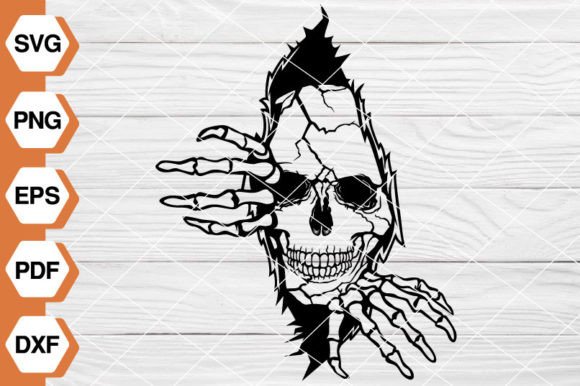
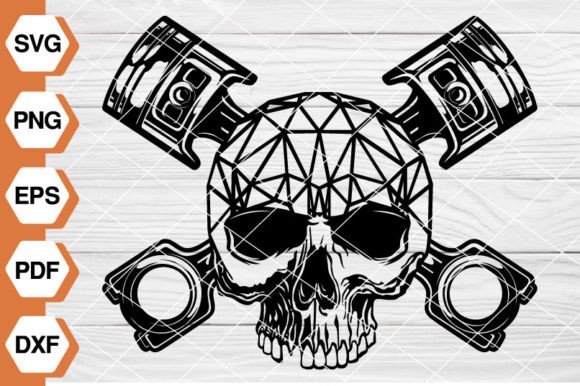
Some designs walk in with a quiet personality. The Skull Mechanic SVG EP127 does the opposite. It shows up loud, detailed, and unapologetically industrial. I opened the file set expecting a straightforward skull graphic, and what I found was a tightly composed piece of art that blends anatomical bone structure with mechanical grit—gear teeth, wrench crossbones, and a grille-like jaw that feels ready to be stitched onto something tough.
Right away, I could picture this on a heavyweight hoodie, the kind a mechanic throws on in a cold garage. The layout is balanced, with the skull centered and the mechanical elements radiating outward in a way that reads clearly even from a distance. That clarity is exactly what you need when you’re planning a finished embroidered product. No one wants to squint at a patch and ask, “What is that supposed to be?”
The mood is edgy but not cartoonish. There’s a seriousness to the design that makes it feel like a piece of shop art, not just a novelty. That’s a big deal when you’re creating products for customers who work with their hands. They’ll appreciate the craftsmanship in the artwork itself, and that goodwill transfers straight to your handmade product.
From Digital Graphic to Embroidered Product
Let’s get one thing clear immediately. The Skull Mechanic SVG EP127 is a digital graphic bundle, not a pre-digitized machine embroidery file. You get five file formats: SVG, PNG, EPS, PDF, and DXF. That means you’ll need to convert this graphic into an embroidery design—either by digitizing it yourself, hiring a professional digitizer, or using it as a template for appliqué work.
For me, that’s not a drawback. It’s a blank canvas. The SVG and EPS files give you fully scalable vector art, so you can size the skull up for a jacket back or down for a cap without losing a single gear tooth. The DXF file is a bonus if you’re using a cutting machine to create fabric appliqué pieces. The PNG and PDF are perfect for client mockups, product listings, or even creating heat-transfer mockups before you commit to thread.
SVG, EPS, and DXF: Scaling Without Guessing
When I loaded the SVG into my design software, I immediately checked the small details—the wrench handles, the eye sockets, the gear spokes. They held up beautifully at 8 inches wide. At 3 inches, some of the tinier mechanical flourishes started to blur, which is normal. The vector files mean you can test those sizes quickly and decide what will translate into thread. If you’re planning a machine embroidery design for a standard 4x4 hoop, you’ll likely need to simplify the artwork or focus on the skull’s core elements. The DXF file makes that easy if you lean toward appliqué: cut the main shapes from fabric, layer them, and stitch the details on top.
PNG and PDF: Mockups and Client Previews
The high-resolution PNG is a lifesaver for creating printable mockup images. I dropped it onto a photo of a blank tote bag and a denim jacket, and the black-and-white version popped cleanly. The PDF is crisp enough to print a full-size template for placement and alignment. If you’re an Etsy seller or small shop owner, these quick previews help customers visualize the finished product, which directly boosts buyer confidence.
Real-World Project: A Mechanic-Themed Gift
Let me walk you through a scenario I’m actually planning. A client asked me to create a custom birthday gift for her husband, a lifelong motorcycle mechanic. She wanted something that felt personal and rugged, not a generic off-the-shelf present. The Skull Mechanic SVG EP127 immediately came to mind.
I decided to stitch it onto a charcoal gray pullover hoodie—something he’d wear in the shop or out on weekends. The design would sit on the back, about 7 inches wide, fully digitized with a mix of satin and fill stitches. The mechanical elements begged for metallic silver thread against the dark fabric, with the skull itself in a slightly off-white, bone-colored thread to keep it from looking too stark.
Choosing the Right Fabric and Stabilizer
Hoodie fabric is thick, slightly plush, and prone to shifting. I’ll use a medium-weight cutaway stabilizer to lock those stitches down and prevent sagging over time. A water-soluble topper on the front will keep the stitches from sinking into the fleece. For a design this detailed, hooping tightly is non-negotiable. If the fabric shifts even a little, those gear teeth turn into blobs.
Thread Colors and Contrast
I tested a small section of the gear pattern on a scrap of the same hoodie material. The silver thread was bold, but I ended up adding a darker gray outline to the mechanical parts to give them definition. The skull’s eye sockets needed a black fill, not just fabric showing through, because the hoodie’s charcoal color wasn’t quite dark enough to create the hollow effect. These are the small adjustments that turn a good embroidery project into a great one.
Where This Design Shines and Where It Gets Tricky
The Skull Mechanic SVG EP127 is built for larger formats. It thrives on jacket backs, heavy-duty tote bags, tool roll-ups, and oversized patches. The visual impact is immediate—people will notice the detail, the symmetry, and the raw mechanical flavor. It’s a design that can anchor a custom apparel line, especially if you’re targeting the automotive, motorcycle, or industrial workwear niche.
But I’d be careful with small hoop sizes. Below 4 inches, the finer mechanical elements—like the wrench notches and gear teeth—will either disappear or become too dense to stitch cleanly. If you need a smaller version, I’d recommend simplifying the artwork drastically. Maybe keep just the skull and one wrench, or use the design as a pocket-sized patch where a little loss of detail is acceptable.
Ideal Embroidery Projects
- Mechanic’s work jacket or shop apron
- Heavy canvas tool bag or welding cap
- Structured snapback cap with a reinforced front panel
- Embroidered patch for a motorcycle vest or backpack
- Large tote bag with a bold, gritty look
Watch Out for These Fabric Types
Performance blends, thin jersey, and anything with a lot of stretch will fight you on this design. The dense stitch areas needed for the mechanical parts can pucker lightweight fabrics. If you must use a stretchy garment, double up on the stabilizer and consider a basting stitch to hold everything in place. Dark fabrics are fine, but you’ll need to test thread colors against the specific shade. What looks like a bright silver on a white sample might turn muddy on black denim.
Boosting Product Value and Customer Appeal
When I evaluate a design like this, I’m thinking about the end consumer. The Skull Mechanic SVG EP127 carries a strong personality. It’s not generic. That means a finished product with this design feels more intentional, more giftable. A personalized gift featuring this skull—maybe a custom apron with the recipient’s name—becomes a keepsake, not just another piece of clothing.
For craft business owners, this design can elevate your brand. It signals that you understand niche audiences. It also works well in sets: pair an embroidered cap with a matching patch or a printed canvas print, and you’ve got a cohesive product line. The high-resolution files in this bundle make it easy to create consistent branding across embroidery, screen printing, and digital mockups.
Practical Designer Notes Before You Stitch
I’ve been burned by assuming a design will stitch perfectly. So here’s my checklist whenever I work with a new graphic like Skull Mechanic SVG EP127:
- Test the digitized version on a scrap of the exact fabric you’ll use. Not a similar one—the exact one.
- Check thread tension after every color change. Metallic threads can be finicky.
- Review the stitch density. If the gears are packed too tight, the fabric will stiffen like cardboard.
- Print the design in black and white at actual size to see if the contrast holds up without color.
- Look at the mockup on both light and dark backgrounds. What works on a white T-shirt may disappear on a black hoodie.
- Confirm the commercial licensing. You’re buying a digital download, but you need to know if you can sell finished product items made with this design. The listing doesn’t spell out that part, so check with the seller before you open your shop.
- If you’re offering this as a custom item, show the customer a stitched sample or a high-quality mockup first. The digital file looks great on screen, but the embroidered version will have its own texture and character.
Final Thoughts on Skull Mechanic SVG EP127
I’ve reviewed hundreds of graphics for embroidery use, and Skull Mechanic SVG EP127 holds its own. It’s not a beginner’s design, but it’s not impossibly complex either. The file bundle gives you flexibility—conversion to machine embroidery design formats, appliqué cutting, mockup creation, and scaling. The theme is specific enough to attract a loyal audience but broad enough to work across many handmade product categories.
If you’re a craft business owner looking to add a mechanic-, automotive-, or industrial-themed piece to your line, this is a strong candidate. Just respect the detail level, test thoroughly, and don’t skimp on stabilizer. The finished embroidery will look like it belongs in a professional shop—and that’s exactly the kind of quality that keeps customers coming back.